The VssID application is the official mobile application of the Vietnam Social Insurance Agency, providing users with essential information about their health insurance cards; their participation in social insurance (BHXH), health insurance (BHYT), and unemployment insurance (BHTN); information on receiving social insurance benefits; medical history; and 24/7 online support. It helps participants understand their participation and benefits, while also enabling them to monitor and protect their social security rights, and ultimately replace the current paper health insurance cards and social insurance books.
I. INSTALLING THE VssID APPLICATION
1. Prepare the information for declaration:
- Photos of the front and back of your identity card/citizen's ID card.
- Portrait photos
- Social Insurance Number (the last 10 digits on your Health Insurance Card). Or you can look up your Social Insurance number on the website: https://baohiemxahoi.gov.vn/tracuu/Pages/tra-cuu-ho-gia-dinh.aspx Students only need to fill in 3 criteria on this page: Province, Full Name, Date of Birth to get the Social Insurance number result below.
2. Download the VssID app to your phone:
- For Android operating systems: Go to the Google Play/CH Play icon.
- For iOS operating system: Go to the App Store icon.
→ Type the keyword “VssID” into the search box and select Search.
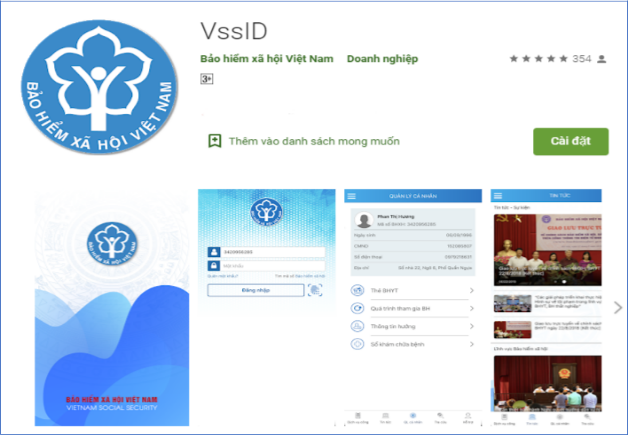
Select "Install" to install the VssID app from Google Play/CH Play.
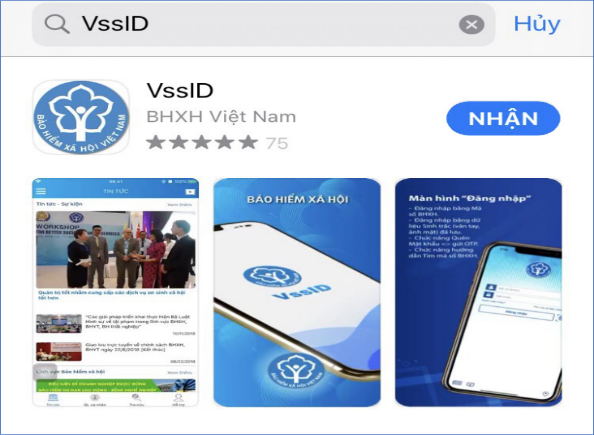
Select "Get" to install the VssID app from the App Store.
II. ACCOUNT REGISTRATION
Users access the VssID icon on their mobile phone screen:
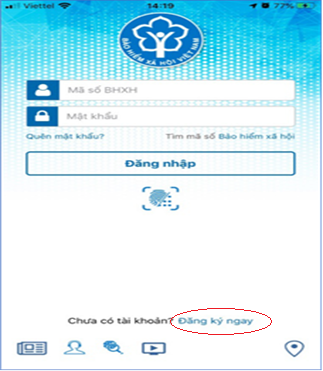
Step 1: Click “Register Now” and select “Continue” to display the registration screen.
Step 2: Select the registration type "INDIVIDUAL" and then click "Next".
Step 3: Declare the information for registering transactions with the Social Insurance agency electronically on the Declaration Form.
* Note:
- Update your portrait photo; and photos of the front and back of your identity card/citizen's ID card.
- Enter the correct phone number to confirm your registration information and the OTP code.
- If students purchase health insurance at their school, select the Hai Ba Trung District Social Insurance Office under the Hanoi City Social Insurance Department to submit their electronic transaction registration application. If students purchase health insurance locally, select the province and district/county where the health insurance was purchased.
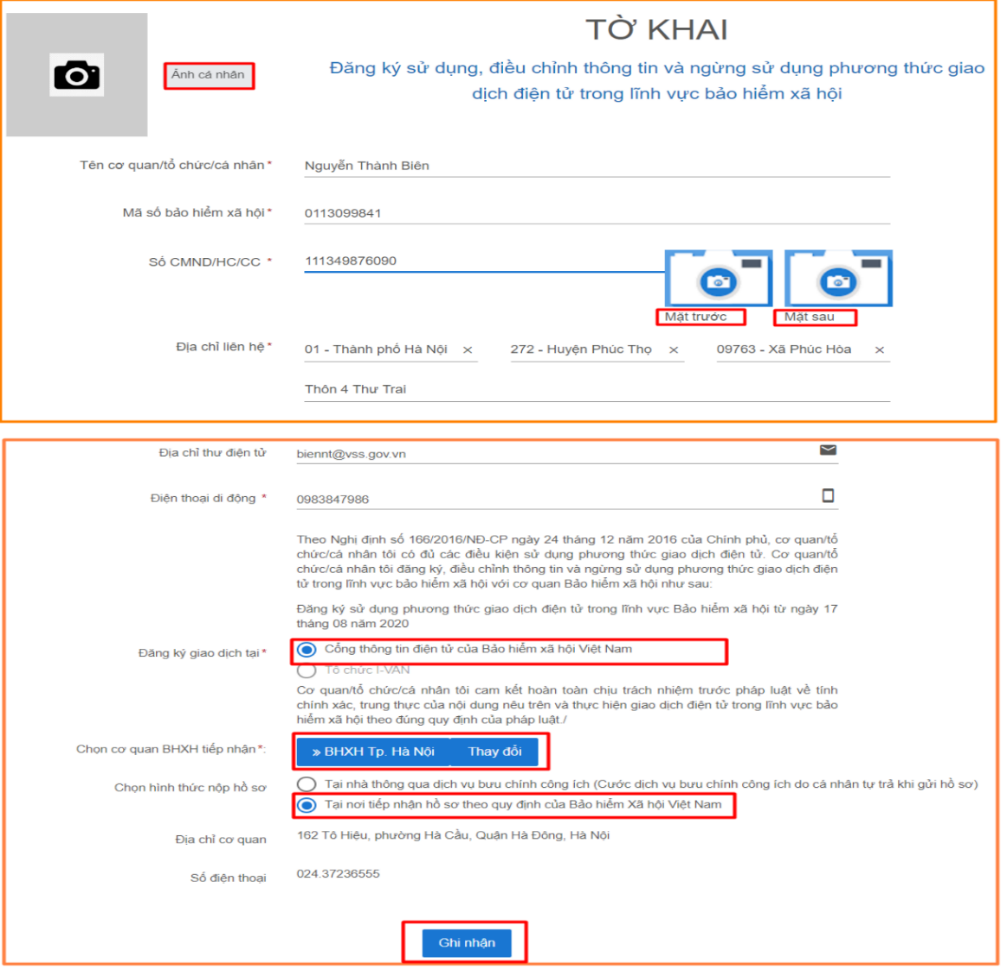
(Choose the nearest Social Insurance agency to submit your electronic transaction registration application.)
Tiếp theo, nhấn “Ghi nhận” để hoàn thành đăng ký. => Cá nhân sẽ nhận được tin nhắn thông báo vào số điện thoại đã đăng ký theo mẫu như sau: “BHXHVN đa nhan duoc to khai cua ma so… voi so ho so là …GD/2021/00107. Vui long den BHXH gan nhat de hoan tat thu tuc. Lien he 19001068 de duoc ho tro” => Tiếp tục chờ đến lúc Hệ thống gửi về tin nhắn thông báo hoàn tất thủ tục có Tài khoản và mật khẩu để đăng nhập vào APP VssID. ( ghi chú: Sinh viên không cần đến cơ quan BHXH để nộp tờ khai)
Step 4: After receiving the notification "Procedure successfully completed," the user uses the account (which is the Social Insurance number) and password from the message to log in to the VssID APP to use the application. The password can be changed after the first login.
III. INSTRUCTIONS FOR USING THE VssID APPLICATION
Step 1: Enter your account (Social Insurance number) and password (previously sent to your registered phone number) into the corresponding fields to log in to the application.
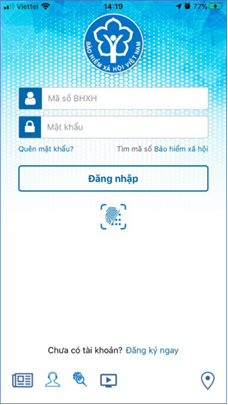
(The Social Insurance number and password are provided by Vietnam Social Insurance via SMS.)
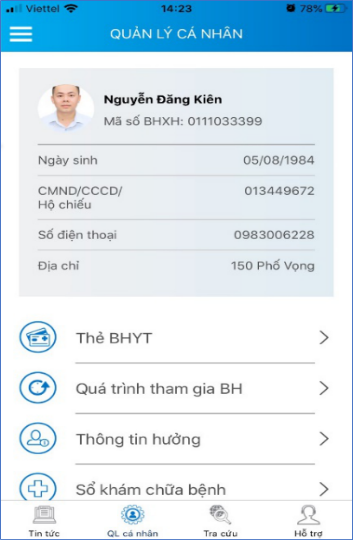
Step 2: After logging into the VssID application, users access the PERSONAL MANAGEMENT function, which displays user information such as: Social Insurance number, full name, date of birth, ID card/Citizen Identification Card/Passport, phone number, address, and other features of the VssID application: Health Insurance card function, insurance participation history, information on social insurance benefits, and medical records.
IV. CASES WHERE DECLARATION IS DECLARED ON A COMPUTER
Log in to the link https://dichvucong.baohiemxahoi.gov.vn and then on the homepage, select "Register" and follow the declaration steps as in Section II.

During the login process, if you encounter any problems while using the VssID - Digital Social Insurance application, please contact the Vietnam Social Insurance hotline at 19009068 for support, answers, and guidance.
Environmental Engineering Faculty Communications Team


